Why SMS Verification Fails (and How to Fix Common Issues)
You are right in the middle of signing up for a new app, maybe Tinder, Walmart, Facebook, or your bank account, and the SMS code never shows up. You wait, refresh, and still nothing. This happens way more often than it should in 2026. SMS verification fails for millions of people every day across dating apps, banking platforms, crypto exchanges, and online stores.
The good news is that most of these failures are predictable and easy to fix once you know what is really going on. There are usually two big reasons it breaks down: the number you are using gets blocked, or the code itself never reaches you properly.
In this guide, we will walk you through the six most common causes and show you exactly how to fix SMS verification fast. If the quick fixes do not work, we will also share the smarter long-term solution that actually works every time.
6 Most Common Reasons SMS Verification Fails
1. Carrier or Network Blocks
The first reason is carrier or network blocks. Many big services now automatically reject codes sent to certain mobile carriers or regions they consider high risk. Your regular phone number might be fine for calls but the verification system still flags it. The simple fix is to try a different network or switch to Wi-Fi calling for a minute and request the code again.
2. Virtual or VoIP Numbers Being Rejected
Second, virtual or VoIP numbers get rejected all the time. Apps like WhatsApp, Instagram, and banking sites have gotten strict about these because they have been overused for spam. If you are using a free virtual number the platform will often block it instantly. The fix here is to use a real mobile-style number from a trusted provider instead of the free ones that everyone else is trying.
3. Expired or Delayed Codes
Third, expired or delayed codes cause a lot of frustration. Some services set the code to expire in under sixty seconds and network delays make it arrive too late. You end up requesting a new one over and over. The practical fix is to wait a full two minutes before requesting another code and make sure your phone signal is strong.
4. Regional or Country Restrictions
Fourth, regional or country restrictions block codes completely. Many platforms only send SMS to numbers from specific countries and silently fail if you are using one from elsewhere. This is especially common with US-based services. The easiest workaround is to use a number from the exact country the app expects.
5. Account or Device Blacklisting
Fifth, account or device blacklisting happens after too many failed attempts. The platform flags your phone or IP and stops sending codes altogether. The fix is to switch devices or clear your app cache and try from a different network.
6. Technical Glitches on the App Side
Sixth, technical glitches on the app side are surprisingly common. The server might be overloaded or the SMS gateway is down for maintenance. In these cases you cannot fix it yourself but you will notice the same error happening to friends at the same time. Wait fifteen minutes and try again.
Quick Manual Fixes You Can Try Right Now
Before you give up there are a few things you can test in under five minutes.
- First, restart your phone completely.
- Second, switch between mobile data and Wi-Fi and request the code again.
- Third, wait a full five minutes before asking for another code because some systems throttle requests.
- Fourth, check your spam or message blocking folder because some phones hide verification texts.
- Fifth, make sure your phone number is entered with the correct country code and no extra spaces.
The Smarter Way – Use Reliable Virtual Numbers
Once the manual fixes stop working, the real answer is to stop relying on your personal phone number and use a reliable virtual number instead. Good virtual numbers bypass carrier blocks, avoid blacklists, and arrive instantly because they come from dedicated SMS gateways.
This is where varifysms.io comes in.
It delivers real, high-success-rate numbers that major platforms actually accept. The codes show up within seconds and stay active for a full fifteen minutes, giving you plenty of time to finish the signup. You can use the same dashboard for multiple accounts without ever touching your real phone.
Step-by-Step: How to Use varifysms.io for 100% Reliable SMS Verification
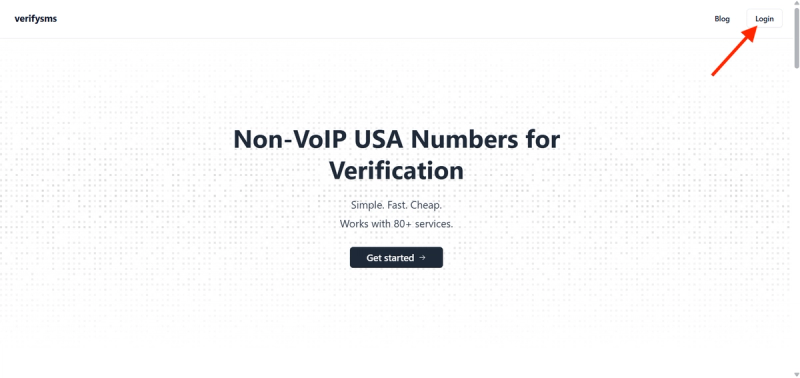
Getting started with varifysms.io takes about two minutes and solves the problem for good.
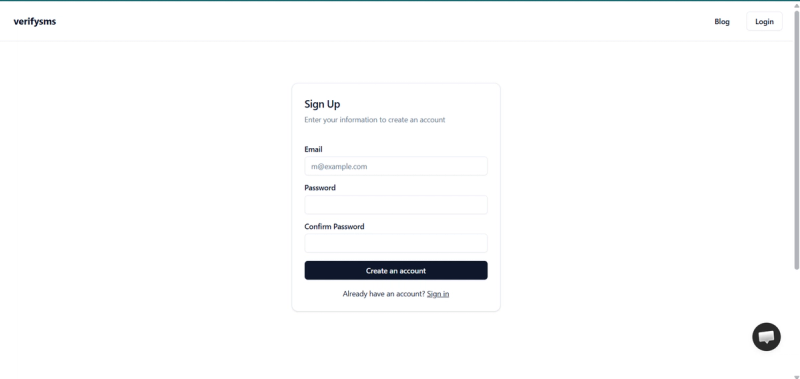
First, create a free account on the site and add a small deposit; ten dollars is more than enough to get started.
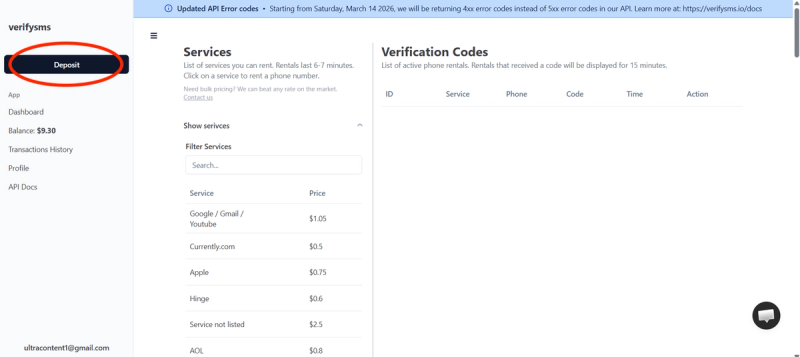
Second, choose the service you need a number for, such as Facebook or another social media app, and buy the number.
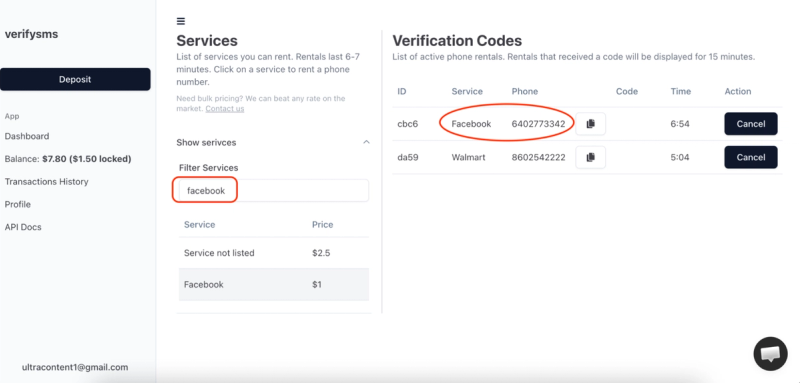
Third, enter that number on the signup screen exactly as shown. Fourth, go back to your varifysms.io dashboard, and the code appears instantly in the same window.
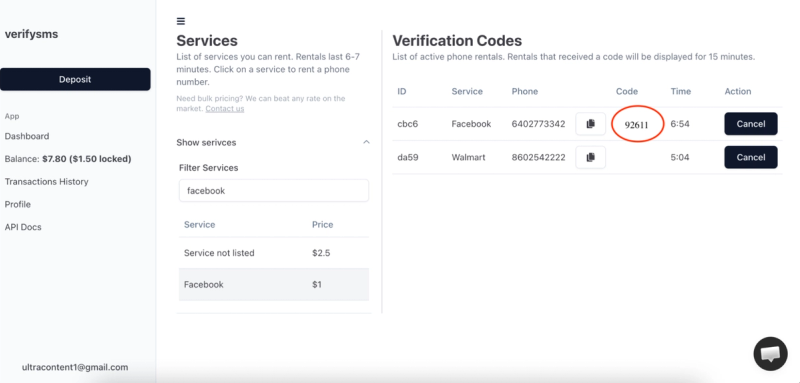
Fifth, copy the code and paste it into the app to finish verification.
That is it. No more waiting, no more failed attempts, and you can repeat the process for as many accounts as you need.
Wrapping Up…
SMS verification fails mostly because of blocks, delays, or the wrong type of number, but every single one of those issues has a straightforward fix. The manual tricks help in a pinch, yet the smartest move is to use a reliable virtual number service that platforms actually accept. varifysms.io takes the frustration out of the process and gives you verification you can count on every time. Stop wasting time on codes that never arrive and start using a system that just works.