
Yahoo still asks for a phone number during sign-up, and plenty of people want to skip using their real one. Maybe you already got banned, need a second profile for testing, or simply value your privacy. Whatever the reason, you do not have to hand over your personal digits. A temporary phone number does the job perfectly, and the whole process takes less than ten minutes once you set it up.
The easiest way right now is through VerifySMS. You create an account, top up with as little as $10, and buy a virtual number specifically for Yahoo. Each Yahoo account here costs you just $0.5, and the verification code stays available for 15 minutes. That is more than enough time to finish the sign-up. Below, we’ll walk you through every single step so you can open your new email account today without any stress.
Step 1: Create Your Account on VerifySMS
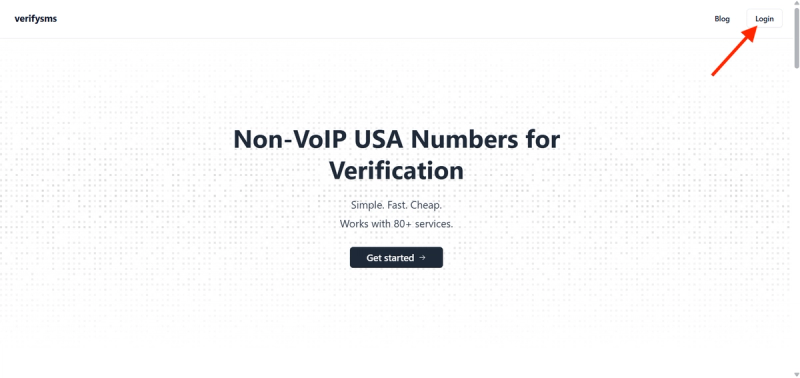
Open your browser and go to https://verifysms.io/. Click the “Get Started” button. The form is quick just enter an email address and choose a password. No long questions, no extra details. Once you confirm your email, you land straight on the dashboard.
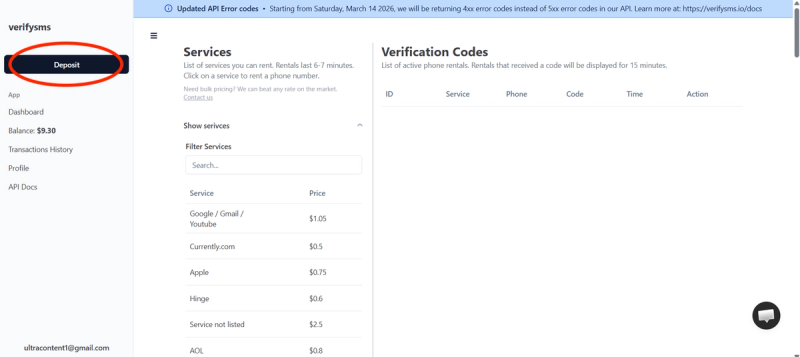
Look for the “Add Funds” or “Deposit” button. You can start with a balance as low as $10 using any major card, crypto, or even some e-wallets. The money appears instantly, and there are no hidden fees on the deposit itself. That small amount already gives you enough for more than twenty Yahoo accounts, so you are ready for multiple profiles if you need them.
Step 2: Buy a Temporary Phone Number
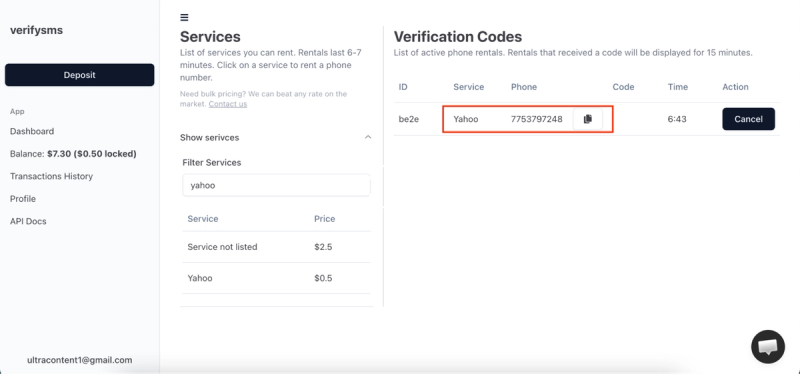
On the dashboard click “Buy Number” or “Services” and search for Yahoo. The list shows the exact price of $0.5 per number, and you’ll receive a US number because VerifySMS only provides specifically USA-based phone numbers.
The number appears on your screen within seconds. Copy it straight away because you will need it right now. This number works only for incoming SMS, so it is perfect for verification and nothing else can reach you through it. If you plan to make several accounts, just buy more numbers one after another; the system lets you keep them all in one place.
Step 3: Start Creating Your Yahoo Account
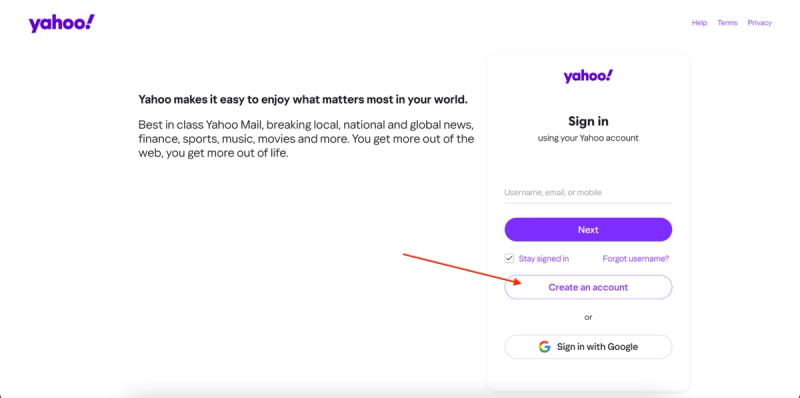
Go to yahoo.com or directly to the sign-up page and click “Create an account” or “Sign up.”
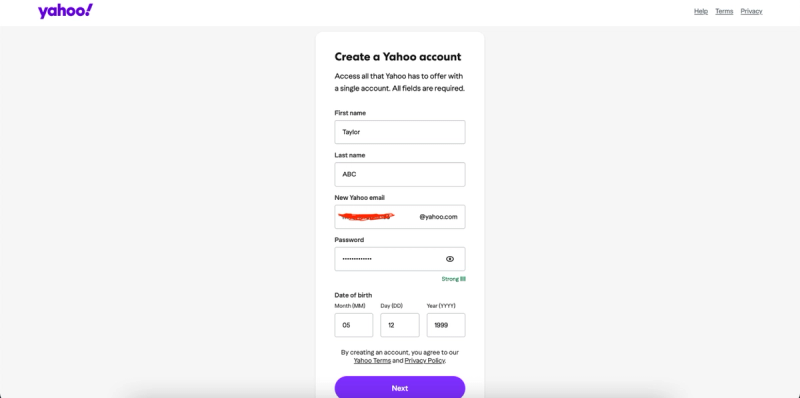
Fill in your first and last name, then choose a username for your new Yahoo email address (for example, yourname@yahoo.com). Create a strong password and click Next.
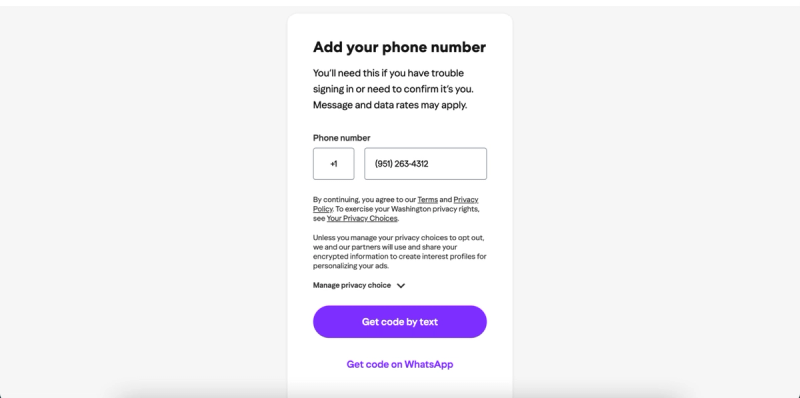
When it asks you to add a phone number for verification, paste the temporary US number you just bought from VerifySMS. Make sure you include the correct country code (+1). Yahoo will send a six-digit code to that number almost immediately. Now switch back to your VerifySMS dashboard.
Step 4: Paste the Code and Move Forward
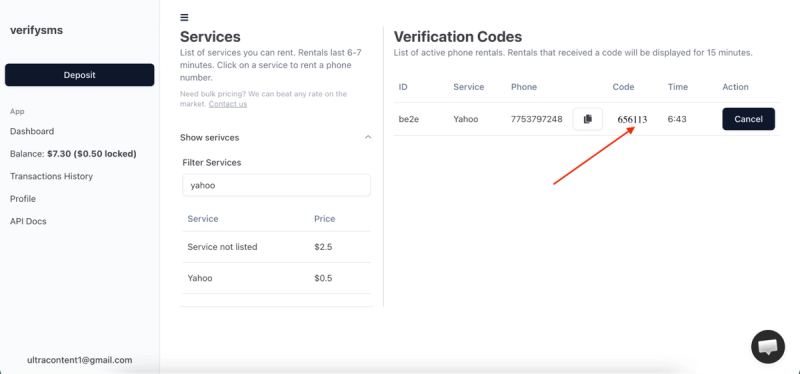
Refresh the page if needed, and the code shows up in the same window where you bought the number. You have 15 minutes to use it before the number expires, but you will be done long before that. Copy the code.
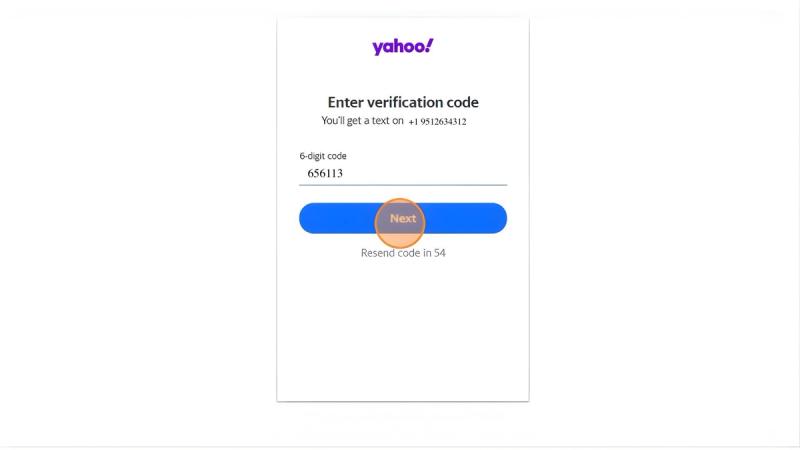
Go back to Yahoo and enter the six-digit code exactly as it appears. The site confirms the number in a second and takes you to the next screen. At this point, Yahoo may ask for a recovery email or security questions, use a fresh Gmail or any email you control if you want extra safety.
Once you hit “Continue” or “Done,” your Yahoo account goes live. Congratulations, you now have a working Yahoo email account that never touched your real phone number.
Step 5: Quick Tips to Keep Everything Smooth
After sign-up, go to your account settings and turn on any extra privacy or security options you like. If you ever get banned again, simply buy another number from VerifySMS and repeat the same process. The site keeps a history of all your numbers, so you can reuse the same dashboard for every new profile.
Most users top up $10 once and make several accounts over a few weeks. The $0.5 price stays the same whether it is your first or tenth Yahoo account. Just remember the code only lasts 15 minutes, so keep the VerifySMS tab open while you sign up.
Why This Method Works Better Than Free Options
Free temporary number websites often fail because Yahoo blocks them quickly. VerifySMS uses fresh USA-based numbers that actually reach the sign-up page every time. The low cost and fast delivery make it the most reliable choice right now. You spend less than a coffee and get full access without risking your main phone line.
You can now send and receive emails, use Yahoo Mail on any device, and enjoy all the free services exactly like any other user. The whole thing stays private, and you stay in full control. If you need more accounts for business testing or just for fun, the same steps work again and again with that same $10 balance. Try it once and you will see how simple it really is. Head over to VerifySMS, add your small deposit, and open your first Yahoo account in minutes. No real phone number, no hassle, and everything stays under your control.