Twitter (now X) remains one of the most widely used platforms for real-time updates, conversations, and networking, but creating a new account often requires phone verification. In 2026, Twitter still asks for a phone number during sign-up to confirm identity and add security. If you need a fresh account for privacy, testing, business, content management, or because you have reached limits on personal numbers, you do not need to share your real phone number.
The straightforward solution uses a temporary USA phone number from VerifySMS. You sign up for free, deposit as little as $10, and buy a dedicated number for just $0.75 per Twitter account. The verification code stays active for a full 7 minutes, giving you plenty of time to finish the process. The whole setup usually takes under ten minutes.
VerifySMS provides real non-VoIP USA phone numbers that work reliably with Twitter. This guide walks you through every step so you can create your new Twitter account today without using your personal phone number.
Why You Might Need a Twitter Account Without a Phone Number
Many people want additional Twitter accounts for work, content testing, separate personal and professional profiles, or managing multiple brands. Others hit verification walls after creating several accounts on the same number. Privacy concerns also drive the need for alternatives, especially if you prefer not to link your main mobile to every social platform. Free temporary number sites often fail because Twitter quickly detects and blocks them. VerifySMS solves this with premium USA numbers that pass verification consistently. Once set up, your new account works fully for posting, following, messaging, and linking other services.
Step 1: Create Your Free Account on VerifySMS
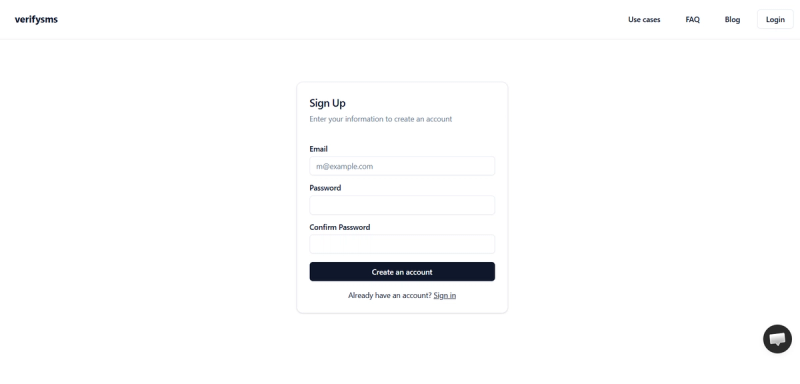
Start by opening your browser and heading to https://verifysms.io/. Click the “Get Started” or sign-up button. The form asks only for a valid email address and a strong password. No extra personal details are required, keeping the process quick and private.
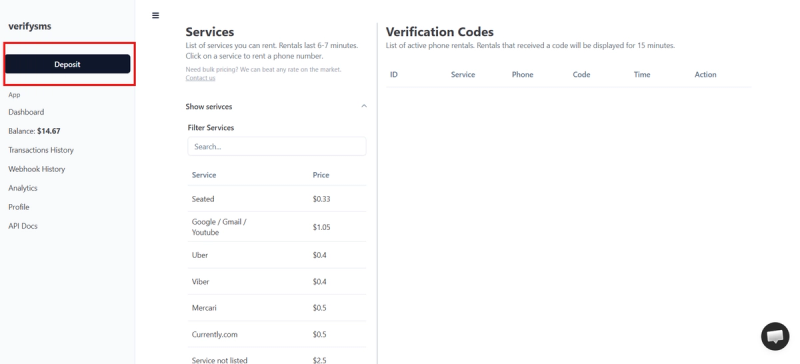
After you confirm your email, you land on a clean dashboard. Look for the “Add Funds” or “Deposit” button. You can deposit as little as $10 using a card, crypto, or supported e-wallets. Funds appear instantly with no hidden fees.
That small balance covers multiple Twitter accounts since each one costs only $0.75. You are now ready to buy your first temporary USA phone number.
Step 2: Buy a Temporary USA Phone Number for Twitter
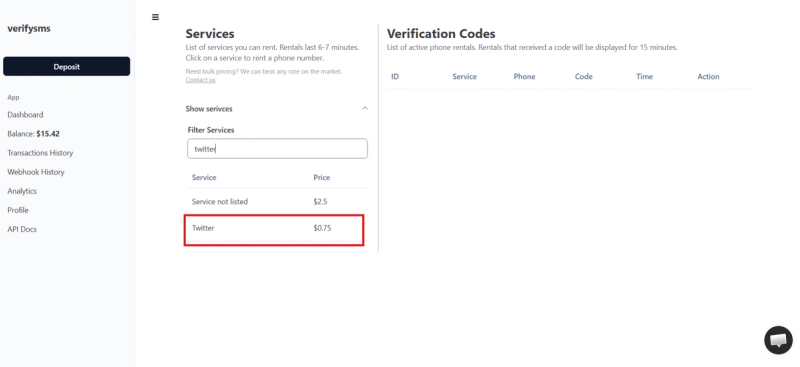
On the dashboard, click “Buy Number” or navigate to the Services section. Search for “Twitter” (or X) in the list of supported platforms. The price shows clearly as $0.75. VerifySMS supplies real non-VoIP USA numbers, which explains their high success rate with Twitter.
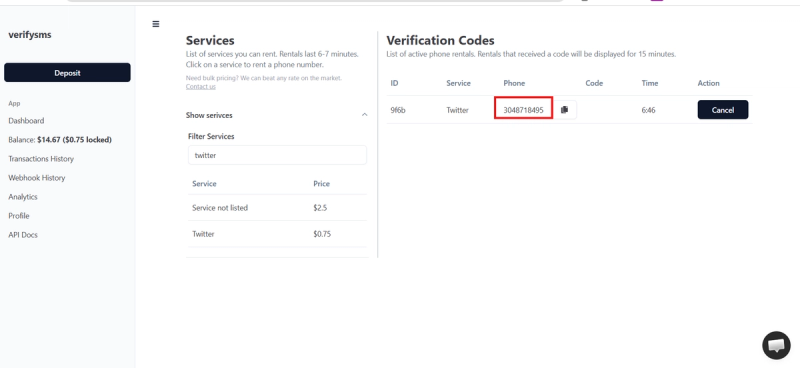
Select the service and purchase the number. It appears on your screen within seconds. Copy it right away because you will need it for the Twitter sign-up. If you plan multiple accounts, buy several numbers one after another. All your numbers stay organised in the same dashboard for easy access.
Step 3: Start Creating Your Twitter Account
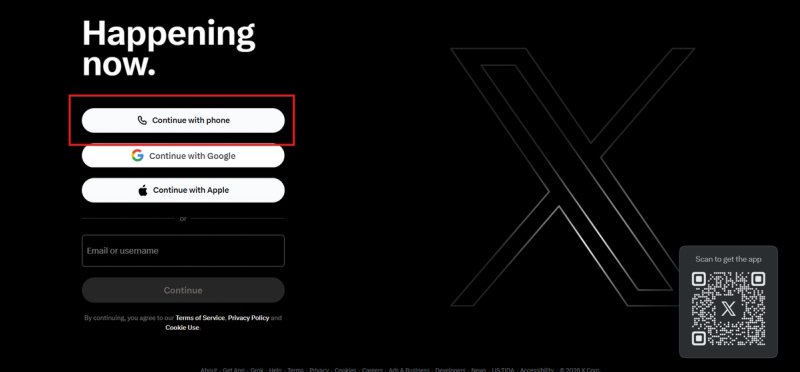
Go to the official Twitter/X website at x.com (or twitter.com) or open the Twitter app and click “Sign up.” Choose to sign up with phone or email. Enter a fresh email address if you want full separation from your main accounts.
Twitter will ask for your name and username. Provide the details you want for the profile. Next comes the phone number field. Paste the temporary USA number you bought from VerifySMS, including the correct country code (+1 for USA). Double-check the format to avoid errors.
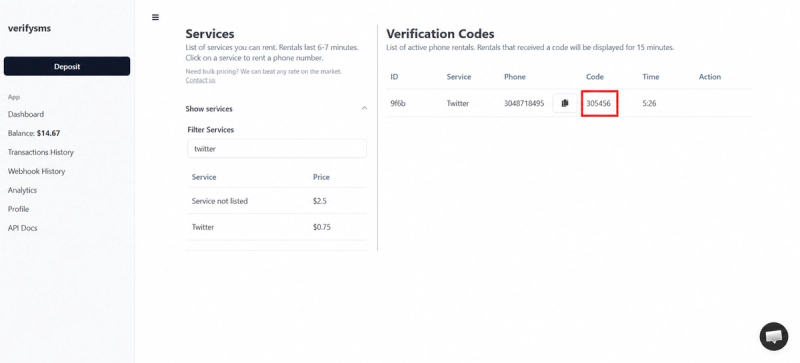
Twitter will send a verification code via SMS to that number. Switch back to your VerifySMS dashboard. Refresh the page if needed, and the code appears in the verification codes section. You have 7 minutes to use it, but the transfer usually happens instantly.
Copy the code and paste it into the Twitter verification screen. Twitter confirms the number right away and continues the setup process.
Step 4: Complete Your Twitter Account Setup
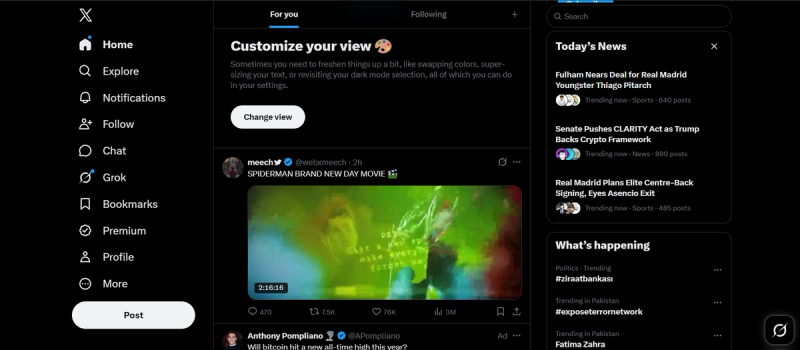
After phone verification, Twitter asks for additional details such as date of birth, interests, or profile information. You can customize your profile, add a bio, and upload a photo later. Some users add a recovery email at this stage for extra security.
Once you finish, your new Twitter account becomes active. You gain immediate access to post, follow, like, and message, though full features and higher limits may require further verification over time. The temporary number has done its job, and you never needed to use your real phone.
If you want to create multiple accounts, return to VerifySMS, buy another number for $0.75, and repeat the process. The dashboard keeps everything tidy so you can manage several profiles without confusion.
Step 5: Quick Tips to Keep Your Twitter Account Smooth
After setup, log into your new Twitter account and review the security settings. Enable two-factor authentication if available through the app or email for added protection. Avoid linking the account to your main personal details if privacy remains your priority.
If Twitter later requests additional verification, you can often handle it with documents or email rather than another phone number. For future accounts, the same VerifySMS workflow works reliably. Many users top up $10 once and create several Twitter profiles over time using the same balance.
Practical Advice for Multiple Accounts and Privacy
If you run an online presence, manage brands, or need testing environments, creating several Twitter accounts helps keep profiles separate. VerifySMS supports this perfectly since you can buy as many USA numbers as needed from the same dashboard. Each costs only $0.75 and comes with a reliable 7-minute code window.
Always use strong, unique passwords for every Twitter account and avoid reusing recovery emails. For developers or power users, the platform also offers a powerful API with clear arguments and sample code, making bulk account creation straightforward.
Why VerifySMS Works Better Than Free Options
Free temporary number websites often fail with Twitter because the platform detects and blocks VoIP or recycled numbers quickly. VerifySMS focuses on premium, fresh non-VoIP USA numbers that pass verification every time. The clean dashboard makes the entire process fast and beginner-friendly, while the API suits those who need to scale up operations.
You maintain complete control over your privacy without risking your personal phone line. Success rates stay high across services like Twitter, PayPal, and others because the numbers behave like real mobile lines.
Final Thoughts
Setting up a Twitter account without a phone number no longer needs to be complicated or risky. With VerifySMS, you follow a simple, repeatable process that delivers reliable USA numbers for just $0.75 each. Start at https://verifysms.io/, create your free account, deposit $10, and buy your first number. In under ten minutes you will have a fully functional Twitter account ready for use.
No real phone number. No hassle. Just a clean, affordable solution that works reliably every time. Whether you need one account or several, this method keeps your personal information protected while giving you full access to Twitter’s features.